 Gardion
Alternatives to screen time for kids: what to offer at the hours they reach for the phone

The easiest way to find alternatives to screen time is to start with the clock: when does your child actually pick up the phone? Most families can name only a handful of those moments: the drive and the waiting room, the hour after school, the stretch before bed, a slow weekend morning. Pick one activity for each moment, set it out ahead of time where your child will see it, and join in for the first few days. When "I'm bored" comes, let it sit for a few minutes; kids often invent their own game in that gap. Below you'll find a one-week plan, a table of screen-free activities by age, and ideas for replacing the phone before bed. To see how much screen time fits each age, try our screen time by age calculator. For how to cut back with a toddler versus a teen, see how to get kids off phones.
Where the phone fits into the day
"He's on his phone all the time" usually turns out to be a few moments that repeat every day. We suggest looking at them one at a time, because each has its own reason.
Waiting and driving. The doctor's office, the back seat, a restaurant before the food arrives. The screen fills empty minutes. Whatever replaces it has to fit in a bag: a notebook and pencil, a deck of cards, a word game like I Spy that needs nothing but your voices.
After school. Your child is tired, and the screen helps them unwind. Calming down without a screen is a skill too, and the American Academy of Pediatrics (AAP) made it one of the questions in its 2026 media recommendations. This hour calls for something low-key with no demands: a snack, a shower, the backyard, half an hour with an audiobook.
Before bed. Here the phone competes with sleep, so it gets its own section below.
Weekend mornings. Parents are still asleep, the house is quiet, and the phone is right by the bed. A little prep the night before goes a long way: a half-built Lego set or a coloring page left out, and a breakfast your child can put together alone.
The AAP's list also asks what other activities media crowds out. Answer that hour by hour, and you have your list of spots that need a replacement.
How to start this week
Swapping everything at once is hard on everyone. We recommend tackling one spot per week.
The AAP's Family Media Plan says the same thing: keep room for other activities and add "fun swaps" such as reading, outdoor play, family games, and hobbies. If you'd like to write down the house rules in full, start from our family media plan template.
- For three days, just notice when your child reaches for the phone and what happened right before: home from school, waiting for dinner, getting into bed.
- Start with the moment that causes the most arguments.
- Get the replacement ready in advance and leave it in plain sight: a book on the pillow, a ball by the door, a board game in the middle of the kitchen table. A bored child won't go looking for something to do.
- Play along for the first few days. A round of cards with Dad beats the phone more often than "go find something to do."
- Make the end of screen time predictable: same time, same words. If a meltdown happens anyway, read what to do about a tantrum when you take the phone away.
- After a week, talk with your child about what stuck, then move on to the next spot.
Boredom is part of the swap
Take the phone away, and the first thing you'll hear is "I'm bored." The urge is to jump in with something fun, and suddenly you're the evening's entertainment. There's a simpler option: agree that it's boring, and wait.
Kids often find something to do on their own in that pause. They build a pillow fort, draw in an old notebook, make up a game for a younger sibling. The AAP devoted a whole clinical report to this kind of play. Playing with parents and other kids builds language, thinking, and self-control, and the authors write that play enhances brain structure and function.
There's research on boredom, too. In a small lab study, British psychologists Sandi Mann and Rebekah Cadman found that people came up with more creative answers after a dull task, and they linked this to daydreaming. It was a small study, and it doesn't translate directly to a kid on a Tuesday night. It does explain why we suggest riding out the first few minutes of complaining instead of drowning them in a new distraction.
Waiting is easier in a room with options: a box of pencils and paper, building blocks, books on a shelf your child can reach. Give them the materials, and they'll supply the story.
Screen-free activities by age
Every age needs room to move. The World Health Organization (WHO) recommends that children and teens ages 5 to 17 get an average of at least 60 minutes of moderate to vigorous activity a day and spend less time on recreational screens. The AAP adds that libraries, parks, and community centers help crowd out screens. The rest depends on age, and we've put ideas for each one in the table.
| Age | What tends to hook them | How to offer it |
|---|---|---|
| 3–5 | play dough, water and sand, a book with a grown-up, hide-and-seek, helping cook | close to you: little kids play longer when you're in the same room |
| 6–9 | Lego, board games, scooter and backyard, a first after-school class, a "grown-up" chore | one activity in sight and a clear order: outside first, then a show |
| 10–12 | a sport, their own project (a model, a comic, baking), time out with friends, a book series | two or three options, and your child picks |
| 13 and up | sports, a part-time job or volunteering, music, hanging out with friends, cooking dinner for the family | talk about money, friends, and independence; "go outside" won't land with a teen |
What to do instead of screens before bed
In the AAP's Family Media Plan, bedtime is one of the screen-free zones. In our view, an empty evening goes more smoothly when it follows the same routine every night, so your child doesn't have to decide what to do each time.
The phone charges in the kitchen or the hallway. If it keeps ending up under the covers, see what to do when your child is on the phone at night.
For this hour, we suggest:
- A book: read aloud to a little one, a book of their own for a school-age kid, with a lamp by the bed; for children under 5, the WHO specifically recommends reading and storytelling with a caregiver
- An audiobook or story on a smart speaker, which works with the lights already off
- Talking about the day: what was funny, what's happening tomorrow
- Getting ready for the morning: backpack, clothes, practice gear
- A warm shower and quiet hands-on things: a puzzle, a coloring book, friendship bracelets
Stars for steps, walks, and chores in Gardion
A new habit sticks faster when your child can see the result. In Gardion, we made it so that moving and helping around the house earn stars.
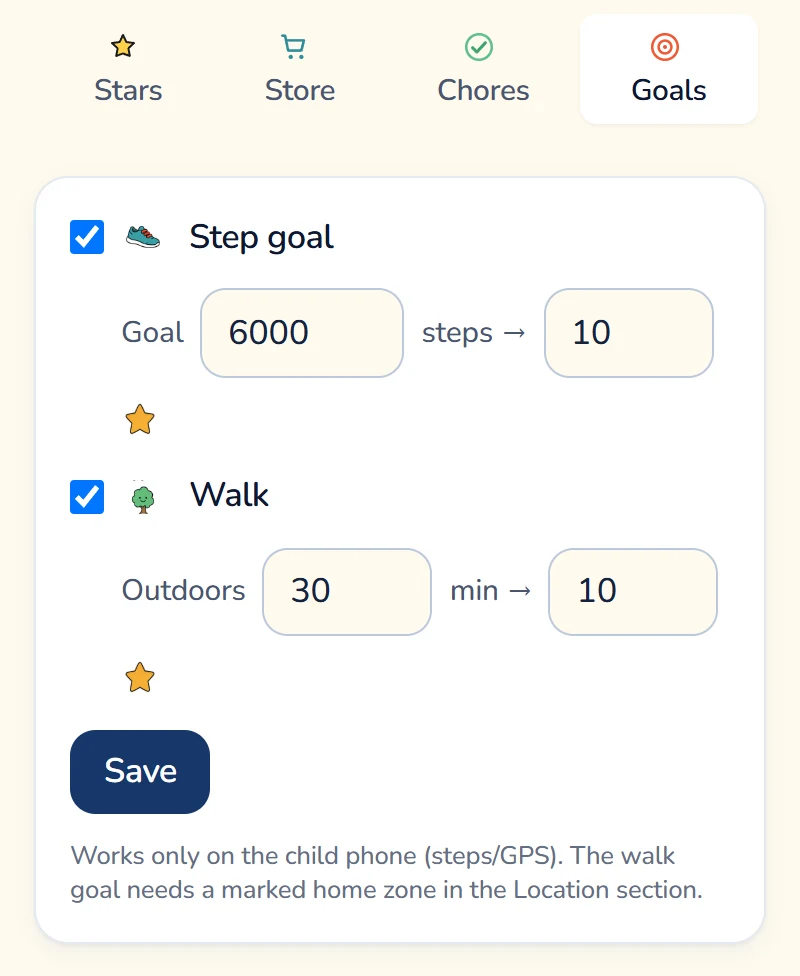
Steps and walks. In the parent dashboard, under Motivation, the Goals tab lets you turn on a Step goal and a Walk goal (a set number of minutes outdoors) and choose the reward. Stars arrive automatically once your child's Android phone counts the goal as met. For walks to count, mark your home zone in the Location section.
Stretch breaks. After a set amount of screen time, Gardion starts a break with exercises. Your child earns a star for each stretch the app counts.
Chores and rewards. You set chores (take out the trash, water the plants, finish a chapter) and can ask for a photo when they're done. Your child spends stars on rewards you come up with: a trip to the movies, picking the family movie, a later bedtime on Saturday. For more on how chores work, see our chore app for kids guide.
Stars can also be traded for screen minutes. You set the rate and the daily cap, and trading is off during school hours and at night. If you want the walk to lead to more off-screen time, fill the store with rewards that don't involve a phone. You can try chores and the rewards store in Premium for free: all features are open for the first 14 days, no card needed.
If your child doesn't want to do anything
Your child may turn down every option: the backyard is boring, books are dumb, the other kids are "weird." We wouldn't jump to conclusions; a swap rarely sticks on the first night. But if your child has stopped enjoying things they used to love, sleeps poorly, pulls away from friends, and gets angry at any attempt to pry them off a screen, the problem is no longer about activities. To tell "spends a lot of time online" apart from a real problem, read our signs of phone addiction, and for what the research says, see our complete guide to phone addiction in kids. If you're worried, start with your pediatrician.
If your family wants to try a whole day without screens, we cover how to prepare in a digital detox for teens and families. You can start small: on Saturday morning, put a deck of cards on the kitchen table and deal the first hand yourself.
Sources
WHO, "To grow up healthy, children need to sit less and play more," 04/24/2019
HealthyChildren.org (AAP), "How to Make a Family Media Use Plan," updated 01/20/2026
Yogman M. et al., "The Power of Play," Pediatrics, 2018
Mann S., Cadman R., "Does Being Bored Make Us More Creative?," Creativity Research Journal, 2014
Links checked 10/18/2026.
In short
Board games, Lego, play dough, a blanket fort, or cooking together. Set out whatever you choose before your child picks up the phone: they probably won't go looking for an activity, but an open box of Lego on the table does the asking for you.
Reading aloud, an audiobook on a smart speaker, talking about the day, or packing the backpack for tomorrow. The AAP lists bedtime among the screen-free zones in its Family Media Plan.
Things that give them independence: sports, a part-time job, music, time with friends, cooking for the family. Offer a few options and let your teen choose; a decision they made themselves lasts longer than any lecture. They don't need one activity for every evening.
Say you get it, and give them a few minutes. Kids often find a game on their own in that pause, especially with paper, Lego, and pencils nearby.
Yes, if the rule is clear and the rate is set in advance. In Gardion, stars for steps, walks, and chores can go toward screen minutes or toward rewards the parent chooses, and it helps to make some of those rewards screen-free.
Set limits in 3 minutes
Limits, schedule and anti-bypass protection on Windows and Android. 14 days of full access, no card needed.
Try GardionOr install the parent app now.
Read next
- Signs of phone addiction: when it's just a lot of screen time and when to worrySix signs of phone addiction in teens from the APA advisory, what doesn't count as a sign, what nomophobia means, and when to talk to a pediatrician.
- Phone addiction in kids: what the science says and what parents can doIs phone addiction a real diagnosis? How a habit differs from a problem and a disorder, what researchers disagree about, and what parents can do. With sources.
- Digital detox for teens and families: does it work and how to plan oneDoes a digital detox help teens? What screen-break studies found, which format fits your family, how to prepare, and what to keep afterward.
- Screen time tantrums: why kids melt down when the phone goes away, and how to end screen time calmlyWhy kids melt down when you take the phone away, what to say mid-tantrum, and why a two-minute warning can backfire, based on research and AAP advice.